How to Track Your Period Online (No Phone App Needed)
You can track your period on a computer without a phone app. Use a browser-based tracker, all-day events in Google Calendar, or a spreadsheet. Kiyo, a personal planner for events, to-dos and habits on the web and iPhone, lets you log period dates and see your estimated cycle behind your calendar in a browser. No account needed.

The best fit depends on what you want from your record: an estimate of your next period, your plans on the same screen, or a file you keep yourself.
Can you track your period on a computer without an app?
Yes. A browser-based tracker, Google Calendar or a spreadsheet lets you track your period on a computer. They differ in whether they estimate your next period, whether they show your plans, and where your records end up. As the NHS notes, using an app or a diary to keep track of your periods can help you see if they're irregular, so even a simple record is worth keeping.
| Option | Estimates your next period | Shows your plans | Where records are kept | Effort |
|---|---|---|---|---|
| Web planner with a cycle layer, such as Kiyo | Yes | Yes | Your browser, or your account if you sign in | Low |
| All-day events in Google Calendar | No, you add each date | Yes | Your Google account | Medium |
| Spreadsheet | Only with a formula you write | No | Your file | Medium |
| Phone app in an Android emulator | Yes, the app's own | Depends on the app | Wherever that app keeps them | High: a large install |
If you already use a phone tracker, check its help pages for a web version or a way to export your records before you switch. For Google Calendar, adding your period to Google Calendar walks through the steps and the sharing settings to check.
When is a dedicated period tracker the better choice?
A dedicated tracker is the better choice when you want to log more than dates. If you track symptoms, flow, mood, temperature or ovulation tests, are trying to conceive, or want detailed records to show a clinician, a dedicated period-tracking app will likely serve you better.
Kiyo is a planner first. Its cycle layer is optional and off by default, and it records period dates only: when each period started and ended. It isn't meant for birth control or fertility decisions.
Kiyo fits when you want to see your estimated cycle alongside the events, to-dos and habits you already plan. Your cycle is context, not a calendar event: the phases appear as background colors behind your dates instead of taking up a time slot. Why your period doesn't need to be a calendar event explains the idea, and choosing a planner with period tracking compares setups in more detail.
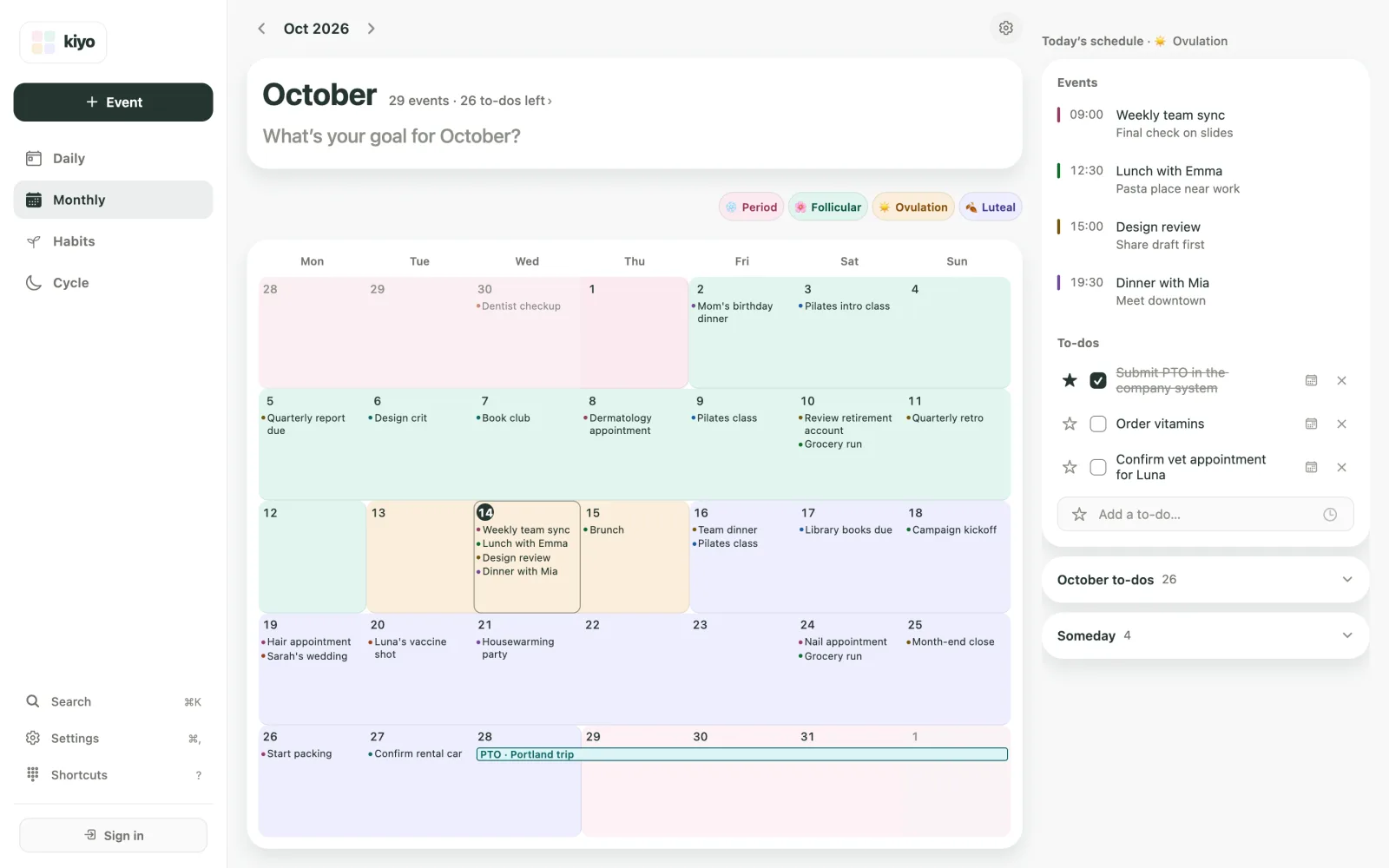
How do you set up your cycle in Kiyo's web app?
You don't need an account to do this:
- Open Kiyo in your browser and go to Monthly.
- On the card that says See your cycle on your calendar, choose Set up. If you closed that card earlier, it appears as a small Show cycle button instead.
- Read the Start cycle syncing screen, which explains what the feature does and where records are kept, then choose Agree and start.
- Answer four questions: whether you're on your period now, when your last period started, your average cycle length and your average period length.
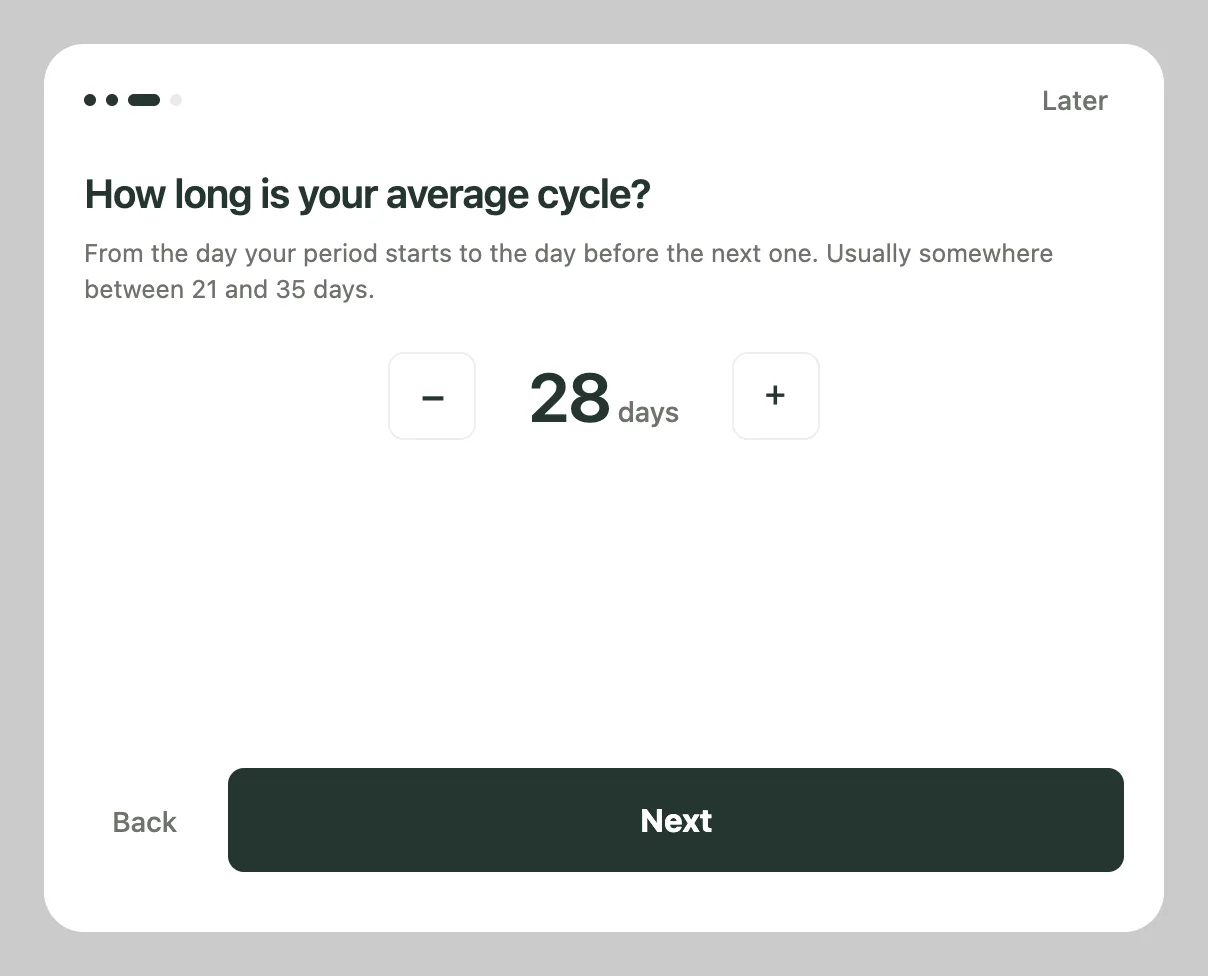
Estimated phases (Period, Follicular, Ovulation and Luteal) then appear as background colors on Monthly, and a Cycle tab is added. Choosing Later during setup closes it without saving anything.
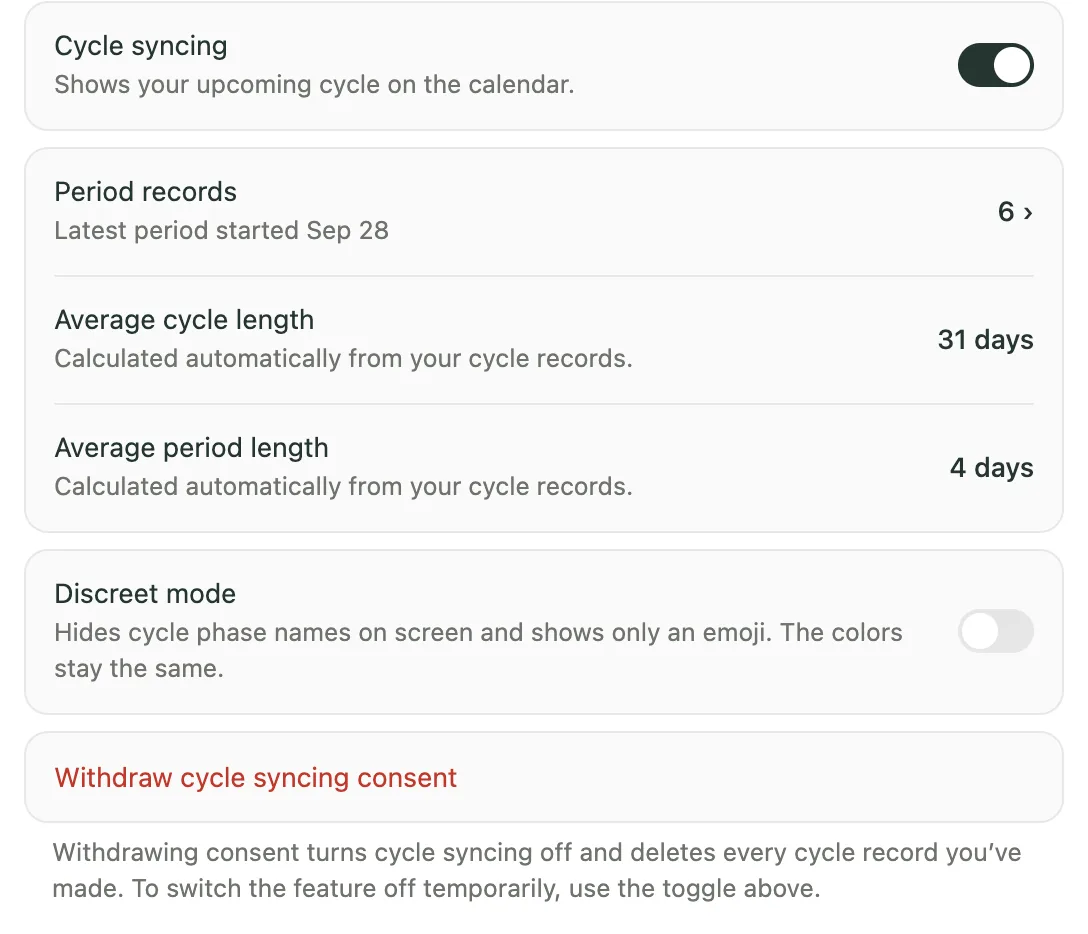
When your next period starts, log it from the Cycle tab with Log your period, or answer Yes when Daily asks Has your period started? If others can see your screen—for example, at work—turn on Discreet mode in Settings under Cycle syncing. It "hides cycle phase names on screen and shows only an emoji. The colors stay the same."
Where are your records stored?
Without an account, your cycle records stay in this browser on this device and aren't sent to Kiyo. The web version keeps them in browser storage, so clearing this site's data in your browser settings deletes them. They also won't appear in another browser. If you sign in later on the web, they aren't added to your account, and signing in deletes them from this browser.
If you sign in with an Apple or Google account, cycle records are also stored on servers used by Kiyo in Japan, so you can use them on the web and in the iPhone app. Either way, Kiyo doesn't use cycle records for advertising or sell them, and they aren't sent to Google Calendar, even if you connect it. Kiyo's usage records never include what you enter, and your use of the cycle features is counted only in aggregate, without an identifier.
To delete your cycle records, go to Settings, then Cycle syncing, and choose Withdraw cycle syncing consent. That turns the feature off and deletes every cycle record you've made. The privacy policy has the full details.
How accurate is an online period tracker?
Its accuracy depends on the records you log. Using a browser doesn't change the calculation. Kiyo uses the average you enter until you've logged four period start dates, then uses the median of your most recent cycles—up to six cycles. How period apps predict your next period explains the method and its limits.
If an expected period goes unlogged, Daily asks whether it has started; after 14 days without a new start date, Monthly stops showing future estimates until you log one. The NHS considers periods irregular when the gap between them is less than 21 days or more than 35 days, and suggests seeing a GP if your periods are irregular. If your cycle worries you, talk to a clinician.
Can you track your period in a spreadsheet?
Yes, if you're happy to do the math yourself. Put each period's start date in column A. In column B, calculate the number of days since the previous period started (for example, `=A3-A2`). Estimate your next period's start date by adding the median gap to the last start date: `=A7+MEDIAN(B3:B7)`.
With starts on May 4, June 1, July 1, July 28, August 26 and September 24, the gaps are 28, 30, 27, 29 and 29 days. The median is 29, so the next start is around October 23. It's an estimate, not a date to rely on for contraception.
For a one-time estimate without saving anything, the period calculator does the same arithmetic in your browser.
Common questions
Can I track my period online without downloading an app?
Yes. A web app, an online calendar or a spreadsheet all work in a browser. Kiyo's web app lets you log period dates and see your estimated cycle behind your calendar, without an account.
Is my data saved if I don't create an account?
Yes, in that browser on that device. Clearing the browser's data for the site deletes it. If you sign in later on the web, it isn't added to your account, and signing in deletes it from that browser.
Can I use the same records on my phone?
Yes, if you sign in. Use the same Apple or Google account on the web and in Kiyo's iPhone app, and your records sync between them. Sign in before you start logging on the web: signing in deletes records made as a guest in that browser instead of adding them to your account.
Does Kiyo work on Android?
Yes. Get the Android app on Google Play, or use Kiyo's web app in an Android browser and add it to your home screen.
Is an online period tracker accurate?
It works like a phone app: it estimates from the dates you log, so accuracy depends on how regular your cycles are and how many you've logged. Kiyo uses the average you enter until you've logged four period start dates, then uses the median of your recent cycles. Estimates shouldn't be used for birth control.