How to Organize Tasks Without Due Dates
Keep tasks without a due date on a separate undated list, often called a someday list, and give each one a date only when you choose a day to do it. Don't invent deadlines to keep tasks visible. Fake dates crowd today's list, and once you learn to ignore dates, you start missing the real ones.

That date you add later is a do date: the day you plan to work on the task, not the day it must be finished. Saving a task and committing to a day are two separate decisions. A good system lets you make the first one now and the second one later.
Where should tasks without a due date go?
On a someday list. A someday list is a single undated list of things you want to do eventually but haven't chosen a day for. It keeps them off today's list without losing them.
The Getting Things Done method calls this a Someday/Maybe list and suggests reviewing it in your Weekly Review, or at least regularly, so you can trust what's on it. Without that review, a someday list turns into a place where tasks are forgotten instead of parked.
In Kiyo, a personal planner for events, to-dos and habits on the web and iPhone, this list is called Someday and lives in Monthly. It stays collapsed until you tap it, and the hint explains how it works: "Save undated to-dos here. They'll stay until completed."
Due date, do date or time block: what's the difference?
A due date is when a task must be finished. A do date is the day you plan to work on it. A time block is the hours you've set aside for it. A task can have any of these, all three or none, and many tasks never have a real due date at all.
| Date type | What it tells you | Example |
|---|---|---|
| Due date | When it must be finished | The passport form closes Friday |
| Do date | The day you plan to work on it | Sort the photos on Sunday |
| Time block | The hours you've reserved for it | Sunday, 2 to 4 pm |
Mixing them up fills your list with tasks that look as though they're due today, even when they aren't. Michael Linenberger, who writes about task management, describes what happens next as a "cry wolf" phenomenon: when most of your due dates are artificial, you get used to skipping them, and then you may not recognize a true one when you see it.
In Kiyo, the date on a to-do works as a do date: it's the day the to-do appears on your list. You can also add a time, which shows the to-do as a block on that day's schedule. Whether something belongs on the calendar at all is a separate question, covered in events, to-dos and habits: what belongs where.
Three rules for a someday list that stays useful
- Write each task so you'll understand it in a month. "Photos" won't mean much later. "Sort the old holiday photos" will. Start with a verb.
- Keep real deadlines off it. If an application closes on Friday, that task needs a date now, not a place on the someday list.
- Review it once a week, briefly. For each item, ask: Do I still want this? Is there a day for it this week? Is it smaller than I think? Then pick a day for one, delete one and leave the rest.
The list doesn't need to shrink every time you look at it. It needs to stay short enough that you actually look.

A worked example: "Sort the old holiday photos"
On Wednesday morning, scrolling past a cluttered folder reminds you of the photos. You already have work and errands planned for today, and the photo task doesn't need to happen on a particular day. So you save the task without a date: in Kiyo's Monthly view, tap Someday to open it and type the task into Add a someday to-do….
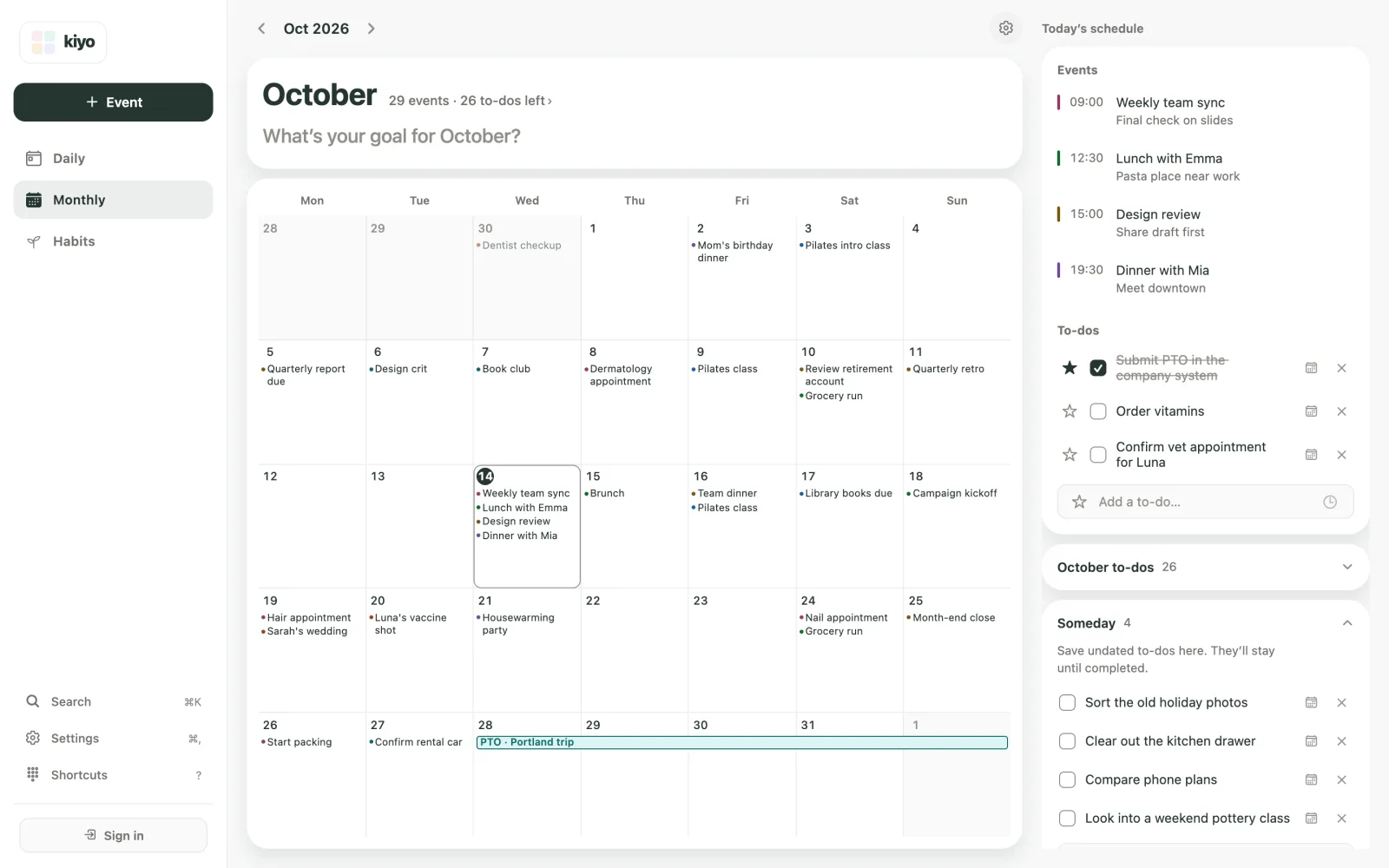
That evening you notice Sunday afternoon is free. Tap the calendar icon on the task's row to open the Date and time sheet, pick Sunday, October 18, and tap Save. Time can stay Not set: you've chosen a day, not booked an hour. On the web with a mouse, you can also drag the row onto a day in the calendar.
The task moves onto Sunday's to-do list. It stays a to-do, not a calendar appointment, and now that it has a date you can star it so it stands out. Stars are for dated to-dos.
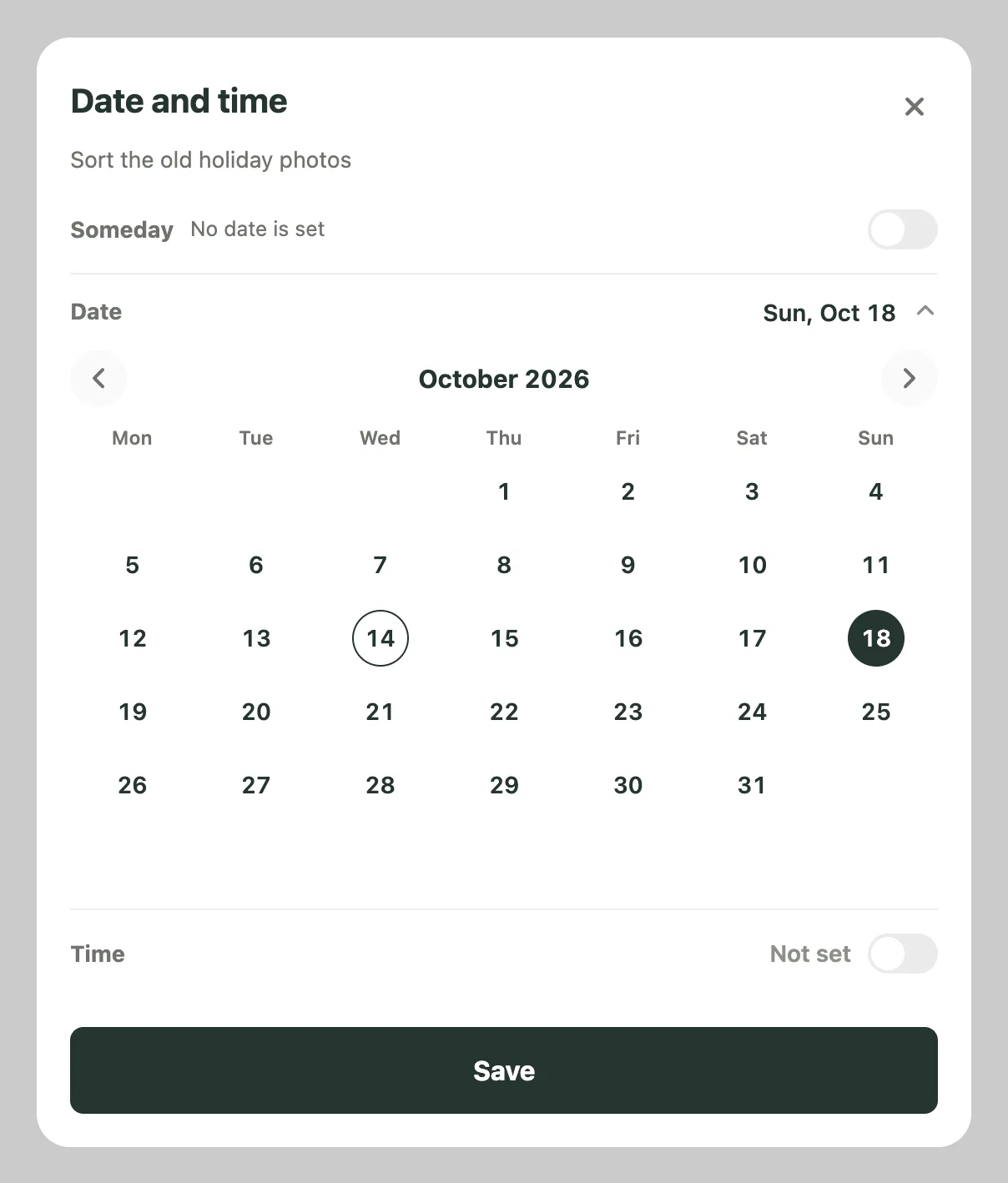
Plans change, and the date can come off as easily as it went on:
- Sunday fills up. Open the to-do's Date and time sheet again, switch on Someday ("No date is set") and tap Save. The task goes back to the Someday list.
- The task feels too big. Tap its text to rename it, say to "Sort one folder of holiday photos." A smaller task is often the one that gets done.
- Sunday passes and the task is still waiting. On Monday, Daily shows a line such as "Yesterday · 1 to-do left" with Move to today, which brings that day's unfinished to-dos onto today's list. You can also pick another day, or send the task back to Someday.
A missed do date isn't a missed deadline. It just means choosing another day or leaving the task undated again.
When should an undated task get a date?
Give it a date when any of the following happens:
- It picks up a real deadline. A form now closes on a specific day.
- Another task depends on it. The passport needs renewing before you can book the trip.
- You've found a day it fits. A quiet evening, or a free weekend morning.
- You keep thinking about it. If it's on your mind every day, choosing a day to work on it often helps you think about it less.
The reverse is worth doing too. When you keep moving a dated task from one day to the next, you may not have found a day that works for it yet. Moving it back to Someday keeps your daily list for things you've actually chosen. On a day with less energy than you planned for, that's one of the quickest ways to make room; see how to plan a low-energy day.
What happens to Google Tasks without a date?
If you connect Google Tasks to Kiyo, tasks from your default list that have no date appear in Someday, and tasks with a date appear on that day's to-do list. With Sync Kiyo items to Google on, which is the default, giving one of those tasks a day in Kiyo also updates its date in Google Tasks. Google Tasks keeps the date, not the time.
Connecting Google requires signing in to a Kiyo account. On the web, records you create as a guest aren't added to your account when you sign in; signing in deletes them from that browser, so sign in before you start. For the full setup, see how Kiyo works with Google Calendar and Google Tasks.
Common questions
What's a someday list?
A someday list is an undated list of things you want to do eventually but haven't chosen a day for. It keeps them off today's list without losing them. Review it about once a week, and give an item a date when you choose a day for it.
What's the difference between a do date and a due date?
A due date is when a task must be finished. A do date is the day you plan to work on it. Many tasks need a do date at some point but never have a real due date.
Should every task have a due date?
No. Give due dates only to tasks with real deadlines. Artificial deadlines are easy to ignore, and once you're used to ignoring them, it's harder to notice the ones that matter.
How often should I review undated tasks?
Once a week is enough for most people. A few minutes while planning the week ahead works well: pick a day for one task, delete one and leave the rest.
Can I take the date off a to-do in Kiyo?
Yes. Open the to-do's Date and time sheet, switch on Someday and tap Save. The to-do moves back to the Someday list in Monthly, on the web and on iPhone.